Desk review: based on the US App Store listing (checked 4 November 2026) and magicbookmark.com (checked 4 November 2026). We did not test the app hands-on.
What does Magic Bookmark do?
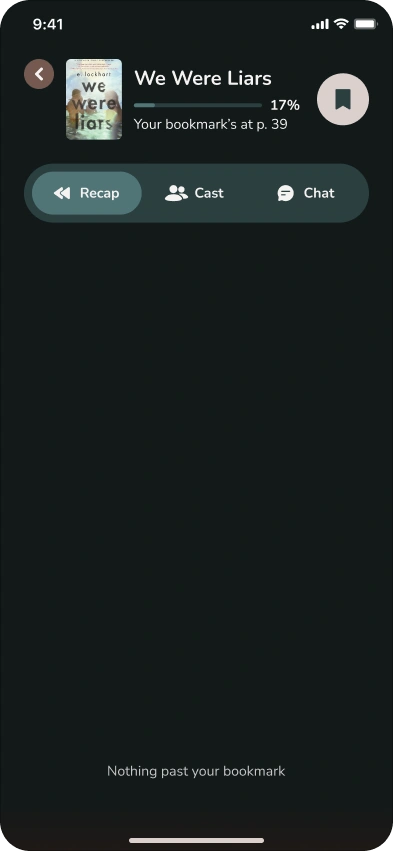
Magic Bookmark: Book Recaps, subtitled "Spoiler-free reading companion", is a companion to a book you already have; it does not contain the book. You tell it where you are, and it syncs to your exact place, not just the chapter.1 Then it offers four things:
- A recap that stops exactly where you are.
- A cast list of who is who and how they are connected, built only from what you have read. New characters appear only once you have met them.
- Questions about the story so far, answered without spoilers, such as whether two characters are together yet.
- Chat with characters: type @ to summon a character, who answers in character and knows the story only up to your page.1
The website's tagline is "We spoil readers, never books", and it calls the approach BYOB: bring, buy or borrow your own book.1
How does a page-locked recap work?
A page-locked recap is a recap limited to what happens up to your current place. With Magic Bookmark the steps are:
- Open the book in the app and choose your title.
- Snap a photo of the page you are on, or type the page number. For an audiobook, enter the last phrase you heard.2
- The app matches that to your place in the book.
- Read the recap, open the cast list, or ask a question. Everything stops at that place.
- Next time you read, update your place. One credit covers the whole book, so the bookmark moves with you.1
Which formats does it work with?
Any format of a supported title. The website lists hardcover, paperback, audiobook, ebook and library loan: "However you read, your bookmark works", and says it works alongside the physical book you own, in any edition or printing.1 Audiobook support arrived in version 1.1 on 21 October 2026, described in the release notes as spoiler-free recaps for any book format; version 1.1.1 on 27 October repeats the note.2 The flow for finishing a book and moving to the next arrived in version 1.0.10 on 19 October.2
How does it fit with memory methods?
It addresses the hardest moment for memory: coming back to a book after a break, when your picture of the people and the situation has faded.3 A recap and a cast list limited to your page rebuild that picture without the spoilers that most online summaries carry.
A recap is still something you read rather than recall. To get the memory benefit as well, try recalling what you remember for a minute before opening the recap, then notice what you had forgotten; self-testing does more for long-term memory than reading again.4 The guide to remembering a book after a break sets out that routine, and how to remember characters in a book shows how a cast list fits in.
Which books does it cover?
Supported titles only. The website says it is launching with the romance, fantasy, romantasy, young adult, science fiction and historical fiction titles popular on BookTok and Bookstagram, adding more every day, and you can request a title in the app. Titles shown on the website include Fourth Wing, Iron Flame, Onyx Storm, A Court of Thorns and Roses, Throne of Glass, The Hunger Games, Mistborn, Dune, Foundation, The Hobbit, Pride and Prejudice, Jane Eyre, Circe and The Book Thief, among others.1 Check the app for a specific title before you rely on it.
What does it cost?
| Pack | Price | Per book |
|---|---|---|
| 1 credit | $4.99 | $4.99 |
| 5 credits | $19.99 | $4.00 |
| 10 credits | $34.99 | $3.50 |
| 50 credits | $69.99 | $1.40 |
As a worked example: a reader who finishes one supported book a month would use the free credit, then about eleven more in a year. One 10-credit pack plus a single credit would cover that for $39.98, or $3.63 per book.
The website also advertises a two-week free trial with "unlimited books, no credit card, and nothing auto-renews", while the App Store listing says your first credit is free. Check which offer applies when you install.1
Who is it for, and who is it not for?
It suits you if you read supported genre fiction on paper, as audiobooks or as ebooks outside Kindle; you often put books down for weeks; you read big-cast fantasy or romantasy series; or you hate stumbling on spoilers in online summaries.
It does not suit you if you read on Android, read mainly nonfiction or titles outside its catalog, read only Kindle ebooks in the US (where Kindle's own recap tools are free with the book), or would rather keep your own notes and cast lists by hand, which this site's templates are for.
What are the limits?
- Supported titles only. It will not help with a book outside its catalog.
- iPhone only today. Requires iOS 16.4 or later. The listing also shows Mac with Apple M1 or later, while noting it is designed for iPhone and not verified for macOS. Android is on the roadmap, according to the website.1
- English only, age rating 13+.2
- Paid per book after the first.
- Privacy label: the listing says identifiers may be used to track you, and lists purchases, contact info, user content (photos), search history, identifiers, usage data and diagnostics as data linked to you.2
- Small number of ratings: 4.8 out of 5 from 25 ratings on the US App Store on 4 November 2026.2
How does it compare with Kindle's tools?
Kindle's Story So Far and Ask this Book do similar jobs inside Kindle ebooks for US readers, at no extra cost with the Kindle book.5 They do not work with print books or audiobooks from other stores. Magic Bookmark works with any format of a supported title, on iPhone, for a per-book price.
| Magic Bookmark | Kindle Story So Far and Ask this Book | |
|---|---|---|
| Formats | Print, ebook, audiobook, library loan | Kindle ebooks |
| Devices | iPhone | Kindle devices and Kindle iOS app |
| Region | US App Store listing | US |
| Catalog | Supported titles | Thousands of popular Kindle titles |
| Price | First book free, then $1.40 to $4.99 a book | Included with the Kindle book |
| Cast list and character chat | Yes | Ask this Book answers questions |
Who makes it?
Yomu Inc. Yomu also makes YOMU - Family Reading Habits, a separate app for family reading routines.