What is new?
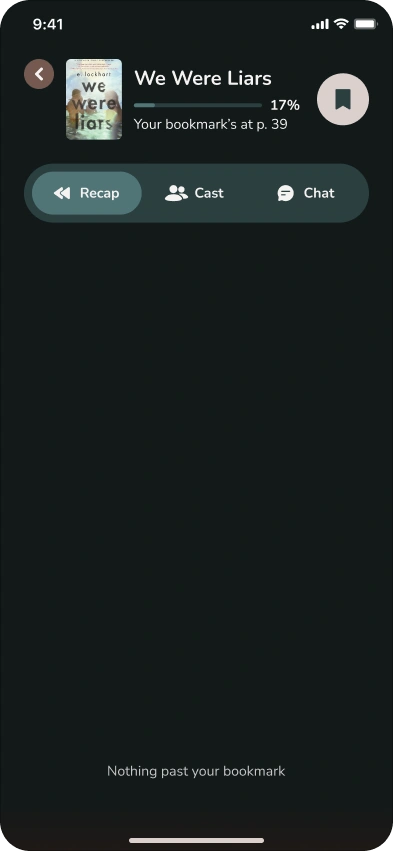
The App Store notes for Magic Bookmark version 1.1, released on 21 October 2026, read: "Now with audiobook support: get spoiler-free recaps for any book format."1 Until now the app found your place from a photo of a printed or ebook page, or from a page number. With audiobooks there is no page to photograph, so you enter the last phrase you heard instead. The app then gives the same three things it gives print readers: a recap that stops at your place, a cast list built only from what you have read, and answers to questions about the story so far.2
Version 1.1.1, on 27 October, repeats the same note. The flow for finishing a book and moving to the next one arrived earlier, in version 1.0.10 on 19 October. The developer is Yomu Inc.
Why does this matter for memory?
Audiobooks are easy to drift through. In one study, people listening to a passage mind-wandered more and remembered less than when they read it silently or aloud.3 Another study found no comprehension difference between listening and reading when people were attending in a lab.4 The practical lesson is that listening works if you can catch up on what you missed.
With a print book, catching up means flipping back a few pages. With audio, it means scrubbing through a recording, often without knowing what you are looking for. A recap keyed to the last phrase you heard is a direct answer to that problem, for the books it covers.
What are the limits?
- Supported titles only. The catalog focuses on popular romance, fantasy, romantasy, young adult, science fiction and historical fiction titles, with more added over time; you can request a title in the app.2
- iPhone only. It requires iOS 16.4 or later. Android is on the roadmap, according to the website.2
- Paid per book. The first book is free. After that, credits cost $4.99 for one book, $19.99 for five, $34.99 for ten or $69.99 for fifty. Credits do not expire and there is no subscription.1
- Small number of ratings. On 4 November 2026 the US listing showed 4.8 out of 5 from 25 ratings.1
- Privacy label. The listing says identifiers may be used to track you, and lists purchases, contact info, user content, search history, identifiers, usage data and diagnostics as data linked to you.1
What should audiobook listeners do anyway?
Whatever tool you use, the habits that help are the same: note your place by the last phrase rather than a timestamp, say a sentence about what just happened each time you pause, and keep a cast list for books with many characters. The guide to remembering audiobooks has the full list, and our notes on Magic Bookmark cover how it fits alongside them.
How does this compare with Kindle's recap tools?
Amazon describes Recaps, Story So Far and Ask this Book as features inside Kindle ebooks, on Kindle devices and the Kindle iOS app, for US customers. Magic Bookmark takes a different route: it does not need the book to be bought from a particular store, because it works from the page or phrase you give it. That makes it one of the few options for a listener who wants a recap of an audiobook up to their place, as long as the title is supported. Our guide to remembering a book after a break has a side-by-side table of the options.
A routine for audiobook listeners
- When you pause, note the chapter and the last phrase you heard.
- Say one sentence about what just happened.
- When you come back after a gap, try to recall the main people and the last event before you press play or open any recap.
- If you need more, rewind a few minutes, or use a recap that stops at your place.
- Add any new names to your cast list.
The recall in step 3 is the part that does the most for memory; the recap fills the gaps it reveals.
What else has changed in audiobook recaps?
Magic Bookmark is not the only audiobook recap. Spotify announced audiobook Recaps on 13 November 2025: short summaries "tailored to your most recent listening point", in beta on iOS for a limited selection of English-language titles.5 Spotify's recaps cover audiobooks you listen to in Spotify. Magic Bookmark's work alongside an audiobook from any source, for its supported titles, because you tell it where you are by typing the last phrase you heard.2 For ebooks, Kindle and Google Play Books offer recaps inside their own stores; we cover those in the post on Kindle recaps and memory.
What we checked on 4 November 2026
The US App Store version history shows the audiobook note first on version 1.1 (21 October 2026) and again on 1.1.1 (27 October). The listing showed 4.8 out of 5 from 25 ratings, and prices from $4.99 for one credit to $69.99 for fifty.1 The website now also advertises a two-week free trial, while the App Store listing says your first credit is free.2 This post was first written on 30 October; we corrected the version in which audiobook support arrived after checking the version history again. Magic Bookmark remains an iPhone app, requiring iOS 16.4 or later, with Android listed on its website as a roadmap item, and it covers supported titles only.2
Who might find audiobook recaps useful?
Listeners who stop and start often: commuters, people who listen at bedtime, and anyone who returns to an audiobook after days away. Audio is hard to skim back through, so a short account of the story so far saves more time than it would for a print reader. As with any recap, a minute of recall first keeps more of the book in your own memory.