What are the three tools?
Recaps. Announced by Amazon in April 2025, Recaps give "previously on" style refreshers for books you have already read in a series. They are for US customers, on Kindle devices, the Kindle iOS app and series pages on Amazon.com, for thousands of best-selling English-language Kindle ebooks.1
Story So Far. Part of the same family, Story So Far gives a spoiler-free recap of the book you are reading, up to where you stopped, for thousands of popular fiction titles on Kindle devices and the Kindle iOS app in the US.1
Ask this Book. Launched on the Kindle iOS app in the US in December 2025, it answers questions about plot, characters and themes without spoilers, for thousands of best-selling English-language ebooks you have bought or borrowed.2 Amazon has said it plans to bring it to Kindle devices and the Android app.1
What is the catch?
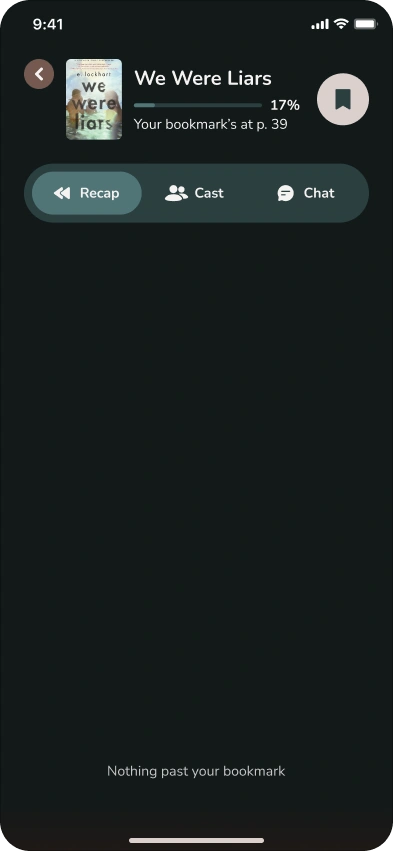
They only work inside Kindle ebooks bought or borrowed through Amazon, and only in the US. If you read a paperback, a library ebook in another app or an audiobook from another store, they do not help. Tools such as Magic Bookmark take the opposite approach: they work with your own copy in any format, but only for their supported titles and only on iPhone, and they charge per book.3 For the Kindle app itself, see the Kindle app review at bestbookapps.com.
There is also a debate about authors' rights. The Authors Guild raised concerns about Ask this Book, including that authors cannot opt their books out.4 Readers who care about that question may want to read the statement.
Does a recap help you remember?
It helps you resume. That is valuable: a book you can pick back up is a book you finish. But a recap is a form of rereading, and the research on memory is clear that reading something again feels more useful than it is. In a classic experiment, students who restudied a passage felt more confident, yet those who tested themselves remembered substantially more a week later.5
So use the order that gets you both benefits:
- Recall first. Before opening the recap, spend a minute on what you remember: who, where, what was about to happen.
- Then read the recap and notice what you had forgotten.
- Then read on.
That one minute turns a passive catch-up into retrieval practice, and the gaps you notice are the details most worth adding to your notes.
Where to go from here
The guide to remembering a book after a break compares the recap tools by format and device, and lays out a five-step way back into any book.
How is this different from asking a chatbot?
A general chatbot does not know where you are in a book. You have to describe your place precisely and trust it not to mention later events, and it can mix up details or invent them. Kindle's tools and apps like Magic Bookmark know your place: Kindle from your position in the ebook, Magic Bookmark from the page or phrase you give it. That is the point of a page-locked recap: the limit is built in rather than requested.
What we would like to know
We found no published research on whether page-locked recaps help readers remember books over the long term, as opposed to helping them resume. It would be useful to know whether readers who use them finish more books, whether a recall-then-recap routine beats recap alone, and whether recaps change how much readers bother to keep notes. If studies appear, we will add them to the evidence table.
Who are these tools for?
Mainly series readers and anyone who reads a book over weeks rather than days, which is most people with busy lives. They are less useful for short books read in a few sittings, where a minute of recall is enough to keep the thread.
Google and Spotify now offer similar tools
Kindle is no longer the only store with a recap that stops at your place:
- Google Play Books, "Catch me up". Part of Book insights, it gives "an overview of what you've read so far" on select English-language titles, on Android, iOS and the web.6 Google said on 2 September 2026 that Book insights had reached more than a million English-language ebooks and the iOS app.7
- Spotify audiobook Recaps. Announced on 13 November 2025 as a beta on iOS for a limited selection of English-language titles; Spotify says recaps cover only the part of the book you have already heard.8
All three work inside their own store's books. The memory point is the same for each: a recap read after you have tried to recall the story works as a check, while a recap read instead of recalling works like rereading.5
Where do these tools sit among 30 reading apps?
In our November 2026 survey of 30 reading apps, four described a recap limited to your place: Kindle, Google Play Books, Spotify and Magic Bookmark.9 Our summary of that study compares their formats, platforms and costs. If you read across stores, no single store's recap follows you: a Kindle recap does not help with a Play book or a paperback. That is the gap that store-independent tools and your own notes fill.
What should readers do with all these tools?
Use whichever one matches the format you are reading, and use it the same way each time: recall first, read the recap second, then a page or two of the book itself. If you switch between formats, keep one set of notes outside any app, so your record of the book does not depend on which store you bought it from.