Why is a book so hard to pick up again?
Forgetting is steepest in the first days after you stop and keeps going over the weeks that follow.1 What fades is not just events but your picture of the situation: who is where, who wants what, and why things happened.2 When you open the book again, the next scene lands on a half-empty model. Names mean nothing, motives are fuzzy, and the book feels harder than it is. Many readers give up here.
A five-step way back in
- Find your exact place. Not the chapter, the page or the line. If your bookmark fell out, find the last scene you clearly remember and read forward until the text stops feeling familiar.
- Recall before you look. Before reading anything, spend a minute writing or saying what you remember: the main people, the last big event, the question you were waiting on. This is retrieval practice, and it brings back more than you expect.
- Reread the last few pages. Two to five pages before your place is usually enough. You are warming up, not studying.
- Check your notes. Read your chapter log lines and your cast list, if you kept them. If you did not, write a quick cast list now from memory and the pages you just reread.
- Read one full session before judging. The first chapter back always feels slow. Give the book a fair session before deciding it has lost you.
Why not just read a summary online?
Because most summaries, reviews, wikis and discussion threads cover the whole book or the whole series. One line about a later chapter can spoil the turn you were heading for. If you look anything up, look only at sources you know stop where you stopped.
Which recap tools stop at your page?
A few tools now produce recaps limited to what you have read. They work in different places:
| Tool | Where it works | How it knows your place | Cost |
|---|---|---|---|
| Kindle Story So Far | Kindle ebooks in the US, on Kindle devices and the Kindle iOS app, for thousands of popular titles | Your position in the Kindle book | Included with the Kindle book |
| Kindle Ask this Book | Kindle iOS app in the US, for thousands of best-selling English ebooks | Your position in the Kindle book | Included with the Kindle book |
| Magic Bookmark | iPhone; your own print book, ebook, audiobook or library loan, for supported titles | A photo of your page, the page number, or the last line you heard | First book free, then $1.40 to $4.99 per book |
| General chatbots | Anywhere | Only what you tell it | Free or subscription |
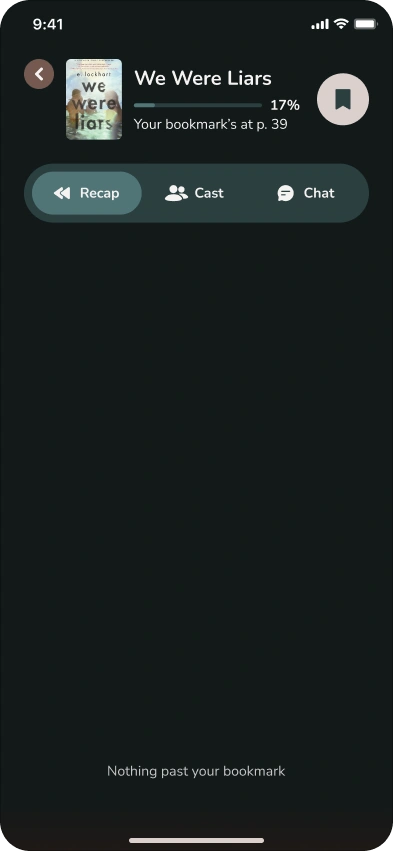
Magic Bookmark works alongside the copy you already have. You snap the page you are on, or type the last line you heard in an audiobook, and it gives a recap that stops at that point, a cast list built only from what you have read, and answers to questions about the story so far.5 Audiobook support arrived in version 1.1 on 21 October 2026.6 It covers supported titles only, mostly popular genre fiction, and runs on iPhone. Our notes on Magic Bookmark list the limits.
General chatbots do not know which page you are on. You have to describe your place precisely and trust them not to mention later events, and they can mix up details.
How do you make the next break easier?
When you know a break is coming, leave yourself a note on the bookmark: the page, one line on what just happened, the two or three names that matter, and the question you are waiting on. Thirty seconds now saves twenty minutes later. A cast list and a chapter log kept as you go make every return quicker.
How long a break is too long?
There is no fixed cutoff. A few days rarely needs more than finding your place and rereading the last page or two. After a few weeks, expect names and the middle of the story to have thinned, because forgetting is fastest soon after reading and then slows.1 After months, the five-step way back in is worth the ten minutes. Starting again from the beginning makes sense mainly when the book is short, when you were only a few chapters in, or when the opening sets up details the rest depends on.
Which new catch-up tools appeared in 2025 and 2026?
Several large reading and listening services now offer a recap limited to what you have already read or heard:
- Google Play Books, "Catch me up". Part of Book insights, it gives "an overview of what you've read so far" on select English-language titles, on Android, iOS and the web.7 Google said on 2 September 2026 that Book insights covered more than a million English-language ebooks and had come to the iOS app.8
- Spotify audiobook Recaps. Announced on 13 November 2025 as a beta on iOS for a limited selection of English-language titles; Spotify says recaps "only cover the portion of the book you've already heard".9
- Kindle Story So Far, described above, for eligible Kindle ebooks in the US.3
Each of these works only inside its own store's ebooks or audiobooks. For a print copy or a library loan, the options are your own notes, or Magic Bookmark on iPhone for supported titles. Whichever you use, recall first and then read the recap.