How we chose
We do not rank apps against each other on this site. Different tools do different memory jobs, and the right choice depends on what you read and what you want to keep. So we grouped apps by the job they do, using the methods with the strongest research behind them: recalling what you read without looking, coming back to it after gaps, and writing about it in your own words.1, 2
For each app we read the maker's own listing, pricing page or help pages on 4 November 2026. We did not test the apps hands-on; this is a desk review. Prices are US prices before tax and can change. More on prices is in our summary of the reading app price index, and more on recap features in our summary of the 30-app recap study.
The short list, by memory job
| Memory job | App | What it does | Price on 4 Nov 2026 |
|---|---|---|---|
| Review your highlights | Readwise | Collects ebook highlights and resurfaces them with spaced repetition | Full Readwise $9.99 a month billed yearly |
| Keep facts exactly | Anki | Flashcards scheduled by how well you recall them | Free on computers and Android; paid iPhone app |
| File ideas across books | Obsidian or Notion | Notes with headings, tags and links | Obsidian free; Notion free plan |
| Keep notes per book | Bookmory, Basmo | Reading journals with notes and quotes | Free tiers; paid from $30.99 a year |
| Log what you read | Goodreads, The StoryGraph and other trackers | Records books, dates and ratings | Free tiers |
| Pick a novel back up, inside one store | Kindle Story So Far, Google Play Books Catch me up, Spotify Recaps | Recap up to your place | Included with the book or service |
| Pick a novel back up, any format | Magic Bookmark | Recap, cast list and questions up to your page; supported titles, iPhone | First credit free, then $1.40 to $4.99 a book |
| Recall a nonfiction book's ideas | Blinkist, Shortform | Someone else's summary of the book | Blinkist Premium $99.99 a year (list); Shortform $24 a month |
Readwise: for highlights you want to keep
Readwise pulls highlights from Kindle, Apple Books and other sources into one place and sends a daily review. The company says it uses spaced repetition to resurface your best highlights "at the right times".3 That makes it the closest thing to a ready-made spaced review system for readers.
- Good for: heavy ebook readers who highlight a lot and want to see those highlights again.
- Limits: a highlight is the author's sentence, not your recall. The review works best if you try to remember what a passage said, or why you marked it, before reading it in full. Print readers need to add highlights by hand or by photo.
- Price: Full Readwise (Reader plus Highlights) $9.99 a month billed yearly ($119.88); Reader only $7.99 a month billed yearly.4
Anki: for facts you must keep exactly
- Good for: textbooks, languages, terms, dates, anything you need to recall precisely.
- Limits: making cards takes time, and cards suit facts better than arguments or stories. For a novel, a few lines of notes do more.
- Tip: write each card as a question you answer from memory, in your own words. That combines retrieval with the benefit of producing the answer yourself.6
Obsidian and Notion: for a commonplace book
A commonplace book files passages and ideas from many books under headings you choose. Obsidian is free, with paid Sync from $4 a month billed annually, and is strongest at links between notes.7 Notion lists a free plan and is strongest at structured databases with fields for source, page and heading.8 We compare both, with Readwise and reading journals, in commonplace book apps compared.
- Good for: readers who want to connect ideas across books and keep them for years.
- Limits: neither brings entries back on its own. Put a monthly review in your calendar.
Reading journal apps: notes kept per book
Bookmory and Basmo keep notes, quotes and progress for each book. Bookmory lets you label notes as book content, summary, thought or question, and exports as text, Markdown or Excel; Premium is $3.49 a month or $30.99 a year.9 Basmo turns your notes on a book into a two-minute audio recap and answers questions from your own notes; it costs $4.99 a month or $39.99 a year, with a 14-day free trial for new subscribers.10
- Good for: readers who like to journal each book as they go.
- Limits: notes stay grouped by book, which makes it harder to follow one idea across many books.
Trackers: a record, not a memory method
Goodreads, The StoryGraph and similar trackers record what you read and when. That helps later: a list of last year's books is a ready-made prompt for recall. Goodreads lets you export your library as a CSV file.11 On their own, trackers do not help you remember the contents of a book, so pair one with a short note per book.
Recaps that stop at your place
If your problem is picking a novel back up after a break, a recap limited to what you have already read is the most direct help. In our survey of 30 reading apps, four described one.12
- Kindle Story So Far: spoiler-free refreshers up to where you have read, on Kindle devices and the Kindle iOS app in the US, for thousands of popular titles.13
- Google Play Books, Catch me up: "an overview of what you've read so far", on select English-language titles, on Android, iOS and the web.14 Google said on 2 September 2026 that Book insights covered more than a million English-language ebooks.15
- Spotify audiobook Recaps: summaries that "only cover the portion of the book you've already heard", a beta on iOS for a limited selection of English-language titles.16
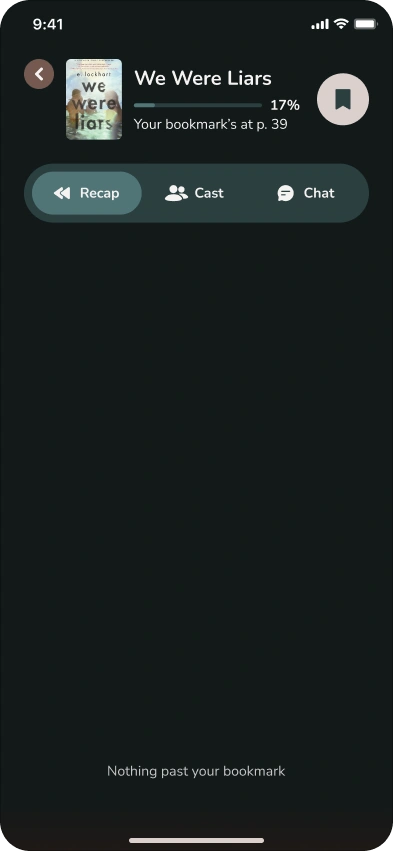
- Magic Bookmark: works alongside a print book, ebook or audiobook you already have. You photograph the page you are on, type the page number, or enter the last phrase you heard, and it gives a recap that stops at your place, a cast list built only from what you have read, and answers to questions about the story so far. iPhone only, supported titles only, led by popular romance, fantasy, romantasy, young adult, science fiction and historical fiction. The first credit is free; after that one credit covers one book, from $4.99 for a single credit down to $1.40 each in a pack of fifty. Its website also advertises a two-week free trial.17, 18 More on our Magic Bookmark page.
The memory catch: a recap read instead of recalling works like rereading. Recall for a minute first, then read the recap as a check. We explain why in do recaps help you remember a book.
Summary apps: someone else's summary
Blinkist and Shortform sell summaries of nonfiction books. Blinkist Premium lists at $99.99 a year; Shortform costs $24 a month, or $16.42 a month billed annually.19, 20 A summary can remind you what a book argued. It does not do the memory work for you: reading a summary is passive, and the benefit comes from producing a summary yourself.6 If you use one, read it after trying to list the book's main points from memory.
What should a typical reader use?
- Mostly novels, with breaks between sessions: a short note per chapter, plus a place-limited recap for your format when you lose the thread.
- Mostly nonfiction ebooks: Readwise for highlights, with a monthly review where you try to recall each highlight first.
- Studying for exams: Anki for facts, plus the read, recite, review routine for chapters, described in how to read a textbook and remember it.
- Ideas you want to keep for years: a commonplace book in Obsidian, Notion or on paper.
- On a budget: a notebook, your phone's notes app and a calendar reminder do every job above except automatic recaps.
Do you need an app at all?
Not for the methods themselves. Every step with strong research behind it can be done with a pencil: close the book and write what you remember, check, and repeat after a few days and again after a few weeks.21 Apps earn their place in three situations: when you highlight so much that you need help finding passages again, when you need a review schedule you would not keep by yourself, and when you have lost the thread of a long novel and want a recap that will not spoil what comes next. If none of those applies, a notebook and the spaced review schedule are enough.
Can an app remember a book for you?
No. Apps can store your highlights, schedule your reviews and rebuild a story you have lost. Memory still depends on what you do with them: trying to recall before you look, and coming back after a gap.2, 21 The best app is the one that makes those two habits easy enough that you keep doing them. For the full method, with or without an app, see how to remember what you read.